Automated Deal Creation in Bitrix24 from Emails: Case Study and Logic
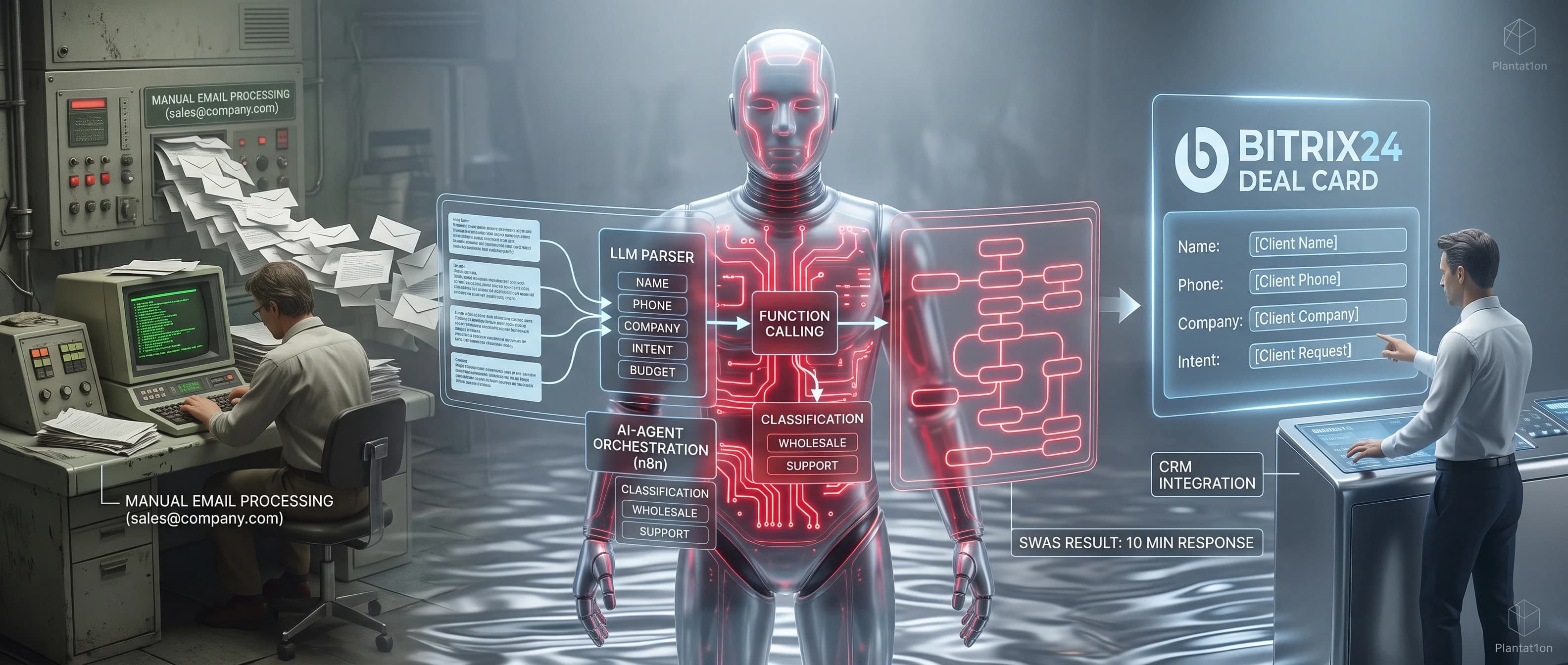
Sales departments often face a common bottleneck: inquiries arrive at a shared corporate email (e.g., sales@company.com) in a completely unstructured format. Managers have to manually read each email, copy contact details, understand the core request, and create a deal in Bitrix24. This wastes hours of productive time and often leads to lost leads due to human error.
Deploying a Digital Employee (AI Agent) completely transforms this process, fully automating the entire workflow.
How the Process Works "Under the Hood"
The heavy lifting is handled by the platform's core, where the AI agent acts as an intelligent assistant:
- Email Monitoring: The system securely connects to the corporate inbox and instantly reacts to every incoming email.
- AI Text Analysis: The neural network "reads" the email just like a human would. From unstructured text, it accurately extracts the key details: client name, contact phone number, company name, and estimated budget.
- Smart Classification: The agent understands the context of the request. Spam and newsletters are discarded. Real inquiries are automatically routed to the right departments (e.g., "Wholesale" or "Support").
- CRM Card Creation: The platform communicates with Bitrix24, passing along the fully prepared data. A new Deal card instantly appears in the CRM at the correct pipeline stage, with all fields populated, ready for an available manager to take over.
Business Results
Using the Plantat1on platform to set up this scenario allows you to:
- Increase Response Speed: The client receives an answer or a call within the first 10 minutes, while they are still highly interested.
- Save Time: Managers no longer work as data-entry clerks. They log into their CRM and find fully prepared deal cards waiting for them.
- Eliminate Errors: AI never forgets to copy a phone number or an important order detail.
This simple case study clearly demonstrates the power of the SWAS (Software Working As a Service) model — you get a ready-made result that immediately drives revenue, rather than just another tool to configure yourself.